Console ports (serial ports for the control of network
equipment) are critical ports. They are designed to input the operational
commands and to output messages including those about equipment failures and
errors. Thus, it is a "lifeline" that ensures secure access under any
circumstances between console ports and components of network equipment that
are part of very critical IT systems.
The
console server SmartCS aggregates all these console ports and enables the IT
administrator to control the network equipment securely and remotely.
Building an independent "manageable network" makes it possible to access
consoles to operate/monitor the equipment via SmartCS, even if the main
network fails.
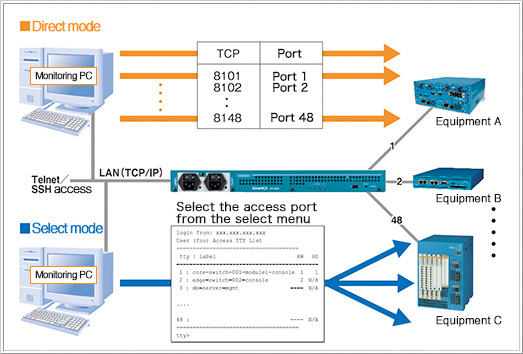
According to your network policy and the operational method, there are two
ways to access the target monitoring device: “Direct mode” and “Select
mode”. “Direct mode” provides direct access to the designated TCP port of
each serial port. Users are also able to choose “Select mode” to select the
device and make a connection with the menu format by accessing SmartCS.
-
Direct mode
Allocate TCP port to each serial port in advance and access the TCP port
directly accordingly
-
Select mode
Select the equipment to access from the displayed menu after accessing
the designated port of the console server
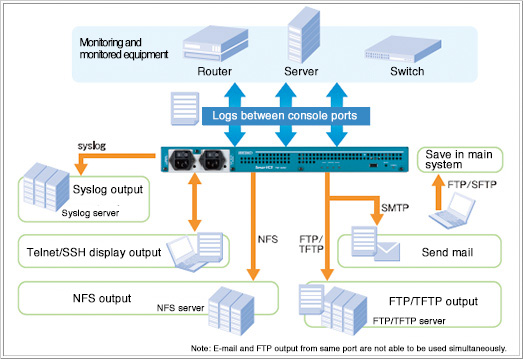
Not only under normal operating conditions but also when the system was
started up, the process was stopped or network problems occurred, various
types of important messages can be output to the console port. The SmartCS
can automatically save and output these messages using a range of methods
including FTP, TFTP, NFS, syslog and e-mail.
Also, using the logs sent between operators and monitoring network
equipment, IP administrators can audit IT network equipment operations for
security management purposes.
SmartCS makes it possible to more safely secure console
access by controlling access and encrypting communications.
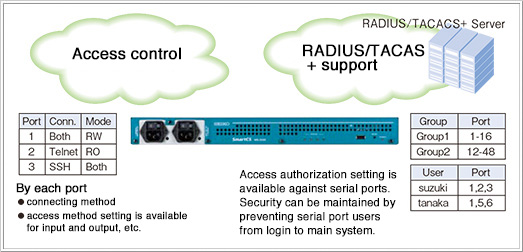
IT administrators can configure access privileges for users and user groups
for each port. For large scale user environments, SmartCS supports the
RADIUS/TACACS external authentication.
To
prevent communications from being intercepted, SmartCS supports SSHv2 and
SFTP for console access.
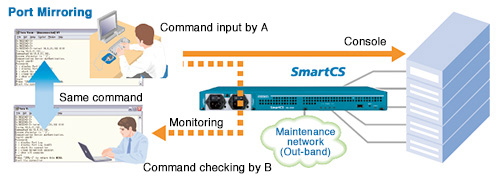
Port mirroring
Port mirroring is a unique function of SmartCS.
With this function, IT specialists in central operation centers can monitor,
check and edit the operation command input carried out by operators in
remote locations.
Configuration backup
Configuration file can be stored in enclosed USB memory.
Simply by inserting the USB memory and booting, the configuration of SmartCS
will be restored. This also reduces time and risk during maintenance, in
particular the risks involved in making mistakes when reconfiguring.
Monitoring DSR signal
SmartCS can detect DSR ON/OFF signals from serial ports
and sends the trap to an external SNMP server. This can be useful when
checking the status of monitoring equipment.
Higher availability
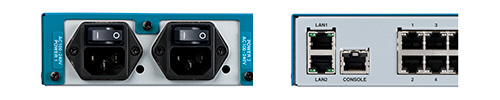
The NS-2250 series has dual AC power supply units and
dual LAN interfaces.
It is available to access to NS-2250 even if an AC power source or network
within the system fails.
Reliable long-term stable operation
The console server is the key element of this "Lifeline"
management network.
SmartCS has been highly evaluated for its high quality and very low hardware
failure record over 30 years.
By
creating a power-saving design that minimizes generated heat, our new
product has been improved so that it now does not contain a fan. This helps
ensure stable operation since there are no moving mechanical parts.
Break-safe
An unauthorized break will never be sent to serial ports
no matter whether the power is turned on/off or if the system is rebooted.
Access gateway SmartGS: integrated management of
controlled equipment
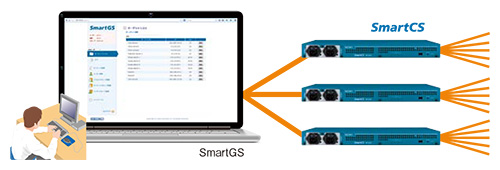
SmartGS is an access gateway server that provides
integrated management of Telnet/SSH hosts, including console servers.
Unified management is available as well as recording of access logs and
operations at the time of Telnet/SSH connection to network equipment or
servers, including console servers.
|